A routing policy decides once which providers a virtual key routes through, what the model tiers mean, and which tools, servers, addresses and models a request may name.
A routing policy is a named set of routing decisions that virtual keys point at. Edit the policy and every key that uses it follows the change; no key is reissued.A policy holds:
Section
What it decides
Where it applies
The organization, teams or projects whose keys may select the policy.
Providers
The model providers the policy routes through, in order. The gateway tries the first one and moves to the next on a failure that is worth another try.
Model tiers
What complex, reasoning and fast resolve to, plus a default model.
Model name mapping
Rewrites of the model name a client sends before the request reaches a provider.
Restrictions
Regex refuse and allow-only lists for tools, MCP servers, web addresses and models. See Policy rules.
Manage policies under AI Gateway, Routing Policies in the sidebar (/gateway/routing-policies). The page groups policies by scope: organization, teams, projects. A project policy wins over a team policy, which wins over the organization policy. Creating, editing and deleting need the routingPolicies:manage permission; viewing needs routingPolicies:view.
The Routing Policies page: an organization policy marked as the default and a project policy.
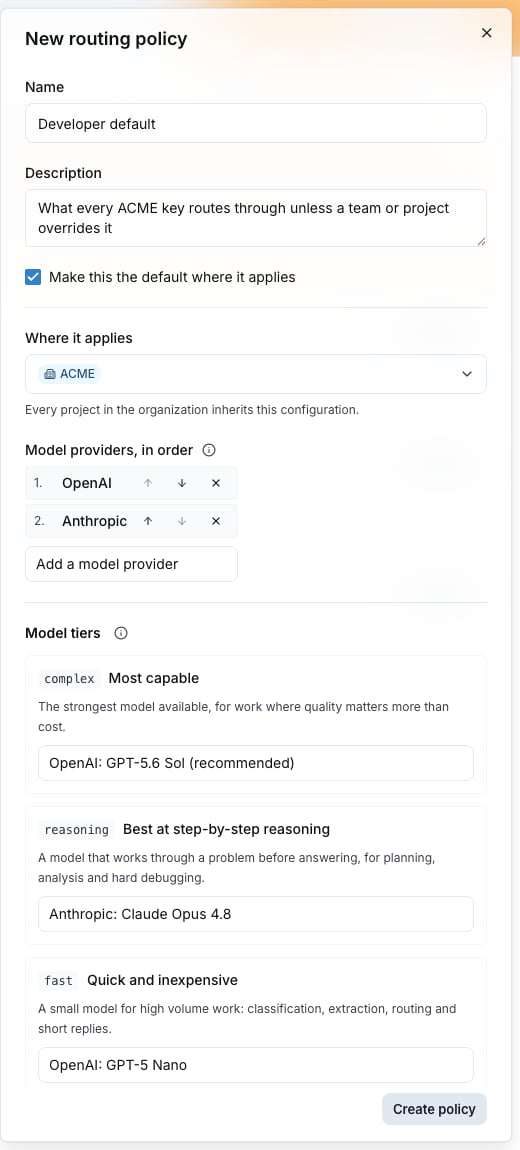
The policy drawer: where it applies, the providers in order, and the three model tiers.
A tier is a reserved model name a client sends instead of naming a model. Point each tier at a model on one of the policy’s providers.
Tier
Meant for
complex
The most capable model.
reasoning
The model best at step-by-step reasoning.
fast
A quick and inexpensive model.
A tier the policy names no target for resolves to the policy’s Default model. A policy with no default model leaves that tier unset, and a request for it is refused as an unknown model.
The response reports the model that served the request in model, and extra_fields.model_requested holds the model the tier resolved to. GET /v1/models on the key lists each tier that resolves to a model, with owned_by set to the provider the tier points at, next to the models of the policy’s providers. A tier with no target and no default model is not listed. Model ids in that list carry no provider prefix.Tiers and name mappings are the same mechanism on the wire: an alias the gateway looks up by exact name. See Model aliases.
A mapping rewrites one requested name to one served name, for example gpt-4o to openai/gpt-5-mini. The served name must be reachable through one of the policy’s providers; the editor refuses a mapping that names a provider the policy does not route through.The key’s own model allowlist is checked against the served model, so a mapping cannot reach a model the key is not allowed to use.
The providers list is the key’s fallback chain. The gateway keeps only the providers that can serve the requested model, then tries them in the listed order. A request for a model on a provider the policy does not include is refused with 400 model_not_allowed, and the message names the policy:
{ "error": { "type": "model_not_allowed", "code": "model_not_allowed", "message": "The \"anthropic\" provider is not available on this key: its routing policy \"EU only\" does not include this provider. Ask the key's owner to add it to the routing policy, or send the request to a provider the policy allows.", "fault": "customer" }}
The key’s own provider access can still list that provider; the policy is what refuses it. A provider that the key’s provider access drops answers 400 model_not_allowed too, with a message that points at the key’s allowed providers instead of the policy. The code is the same for both; the message is what tells them apart.A policy rule under Restrictions is a different refusal. A model a rule blocks, or a model outside an allow-only list, answers 403 policy_violation, and the message names the model, not the policy:
{ "error": { "type": "policy_violation", "code": "policy_violation", "message": "model \"gemini-2.5-flash\" is not in allowlist", "fault": "customer" }}
See Fallback chains for what triggers the move to the next provider.
Click New policy, pick where it applies, add the providers in the order you want, set the tiers and the default model.
2
Point the key at it
Open the key under AI Gateway, Virtual Keys and click Edit. The Routing section is a list of choices: Default: no fallback, Fall back to all eligible providers, then one row per policy the key can reach. Pick the policy and save. The first two choices are the key’s own routing when it uses no policy.
The Routing section of the edit drawer, with the organization policy selected.
3
Verify
Send a request for fast through the key and read model in the response. Then request a model on a provider that the key’s Provider access still lists but that the policy does not, and check for 400 and "code": "model_not_allowed"; the message names the routing policy, which is what tells you the policy refused it rather than the key. To test a Restrictions rule instead, send a request that matches one and check for 403 and "code": "policy_violation".
Make this the default where it applies marks the policy as the default for its scopes; the policies list shows it with a Default badge.
Saving a policy writes a change event. The gateway picks it up on its next change-feed poll and rebuilds the bundles of every key on the policy. Requests already in flight finish on the old configuration.Also check:Policy rules, Model aliases, Fallback chains, Virtual keys.