A budget is a spend cap attached to a scope in your LangWatch hierarchy. Every gateway request is checked against every budget that applies to it: any hard-block breach rejects the request, any warn breach adds a header.

Creating a budget

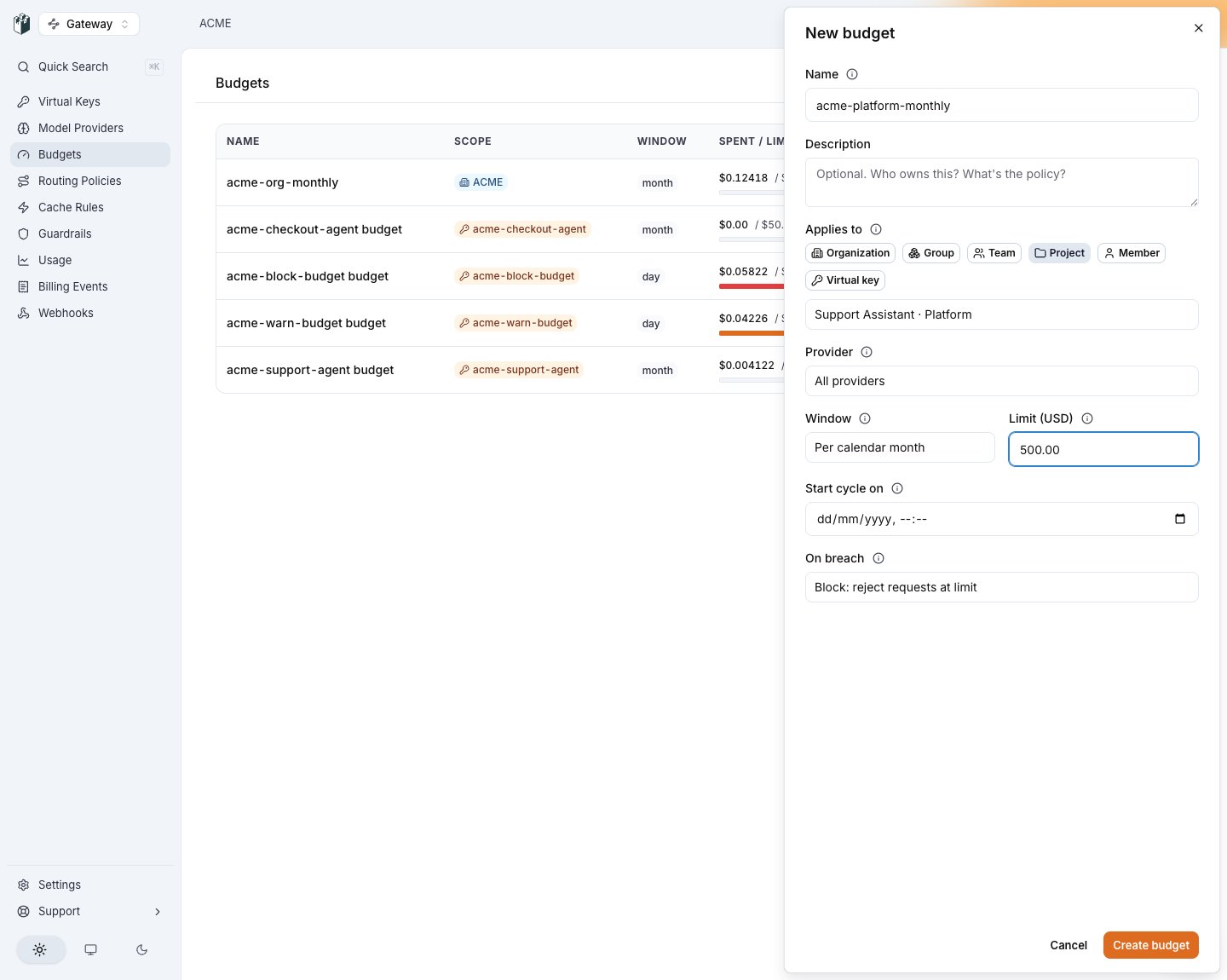
AI Gateway > Budgets > New budget, or over the API:
The budget is in force immediately; the next request counts against it. Everything else is optional: a provider filter, a cycle anchor, a timezone, and your own external_id and metadata.
New budget drawer

The budget drawer targets any dimension, with the provider filter as an orthogonal choice.

Detect spikes before a budget breach: pair budgets with AI Governance > Anomaly Rules so spend-spike, geo-mismatch, and off-hours patterns surface as alerts before they hit a hard cap.

Scopes

A request is evaluated against every budget whose scope applies. A request by Alice in project demo of team platform in org acme with VK prod-key is checked against that org’s, team’s, project’s and VK’s budgets, Alice’s principal budgets, and the per-member budgets of every group Alice belongs to. If any budget hard-blocks, the request is rejected; if any warn threshold is crossed, a warning header is added. Hard-block wins over warn.

A budget has to reach the traffic it names

Which team and project a request belongs to is decided by the key that served it: the teams the key is scoped to, plus the team of the project its traces land in. So a team, project or group budget can be written, look correct on both sides, and match nothing at all, for instance a project budget on a project none of your keys send traffic to. A budget that could never accrue is refused when you create it, with gateway_budget_scope_unreachable. The refusal lists the projects your active keys do reach, in error.meta.reachable_project_ids. Two ways forward:
  • Point a key at the target: give it a scope on that team or project, or set the key’s trace project.
  • Keep the budget as written by sending allow_unreachable: true, which is the right answer when you are provisioning ahead of the keys that will use it. In the app, the refusal offers “Create it anyway”.
An organization with no active keys is never refused, since budget first and key second is a normal setup order. On reads, scope_reach on each budget says reachable or unreachable, which is the only field that tells a budget nothing can reach apart from one that has not been breached.

Group budgets are per member

A group budget targets one of your Groups (the same entity SCIM provisions) and gives each member their own allowance, not one shared pot: a 10/daybudgetongroupengineeringcapsAliceat10/day budget on group `engineering` caps Alice at 10 and Bob at $10, and Bob’s spend never counts against Alice. One budget row covers every member, and someone joining the group is covered on their key’s next configuration resolve. Two consequences worth knowing:
  • Group budgets only apply to keys with a person behind them (a personal VK, or any VK with a principal). A shared service key has no member to charge the allowance to, so cap it with project, team, or virtual_key budgets instead.
  • Group budgets require the ClickHouse spend ledger, because per-member enforcement needs each member’s spend told apart. Deployments reading budget spend from Postgres only refuse the create with group_budget_requires_clickhouse rather than silently capping every member at the group’s combined spend.

Per-end-user budgets (attributed-user templates)

An attributed_user budget is a template, not a cap on one person: anchored on a virtual key or a project, it means “each distinct end user seen here: this limit per window”. One row covers every current and future end user; per-user buckets appear lazily on first spend, keyed <anchor_id>:<end_user_id>, and there is nothing to provision or delete per user. This is the cap layer for platforms that rebill their own customers, whose end users are not LangWatch users (for real LangWatch accounts, use principal or group).
  • The end-user id is resolved from the request: the x-langwatch-end-user-id header, then the x-litellm-end-user-id alias, then the OpenAI user body field. Headers win over the body. The same resolution feeds spend events, so metering and enforcement always agree about who a request was.
  • Fail closed: while a template is active on the anchor, a request carrying no end-user id anywhere is rejected with error.code = "end_user_required", naming both accepted wire fields. A cap evadable by omitting a field is not a cap. The rejection is still recorded per key, and it produces no provider spend.
  • Enforcement is per bucket: one end user at their limit blocks only that user; every other user on the anchor passes. Breaches name budget_scope: "attributed_user" so your product can tell “this user’s cap” from the tenant cap.
  • Like group budgets, templates require the ClickHouse spend ledger.
  • Read one user’s current spend and applicable cap in one call: GET /api/gateway/v1/end-users/:id/spend.
  • How a template reports itself. One template covers many people, so there is no single total to measure anyone against. The Budgets list and detail page headline the per-person cap (“$1.00 per person”) and put the standing underneath as a headcount: “3 of 10 people over cap”, the bar filled to the same ratio and red as soon as anyone is over. “Seen” means an end user with at least one successful request in the current period, so somebody served entirely by an unpriced model still counts, while somebody whose every request failed does not. Over-cap uses the same >= the gateway blocks on, so a person the page calls over is a person being refused. The same two figures ride the API as end_users_seen and end_users_over.

Provider-filtered budgets

Any budget, on any scope, can additionally be filtered to a single provider: “OpenAI $200/month for this team” is one budget with a provider filter, not a new kind of scope. With a filter set:
  • Only requests dispatched to that provider debit the budget. Every ledger debit stamps the provider that actually served the request, so two budgets on the same target with different filters never share spend.
  • On breach, the filtered provider is removed from the request’s candidate chain the way an unavailable provider would be. If the key can fall back, another provider serves the request and the caller sees nothing but a slower first token. Only when the exclusions leave the chain empty is the request blocked, with a 402 naming the budget in error.meta.budget_id and the provider in error.meta.budget_provider.

Windows

minute, hour, day, week, month, total, manual.
  • The five cycling windows roll on a schedule, computed in UTC. By default they align to the calendar: day resets at 00:00, week on Monday 00:00 (ISO 8601), month on day 1 at 00:00. The timezone field exists on the API for forward compatibility, but enforcement does not honor it yet, so the UI states UTC and offers no timezone choice.
  • total never resets, which suits one-off grant-style budgets.
  • manual accrues until you reset it: the period boundary moves only when your system says so. Without it a reset endpoint alone would not help you, because a month budget would still calendar-reset mid-cycle.

Anchoring a cycle to your own date

Set cycle_anchor_at on a cycling window and the period rolls from that instant instead of the calendar. This is how you line a budget up with a billing date: anchored on the 17th at 09:00, every period starts on the 17th at 09:00.
  • The anchor day is never rewritten. A monthly cycle anchored past the 28th clamps into shorter months and springs back: anchored on Jan 31, the periods start Feb 28 (Feb 29 in a leap year), then Mar 31, then Apr 30, then May 31.
  • Fixed windows are pure modulo from the anchor. A week anchored on a Saturday rolls Saturdays; the ISO Monday plays no part.
  • A future anchor is allowed. The budget reads zero and reports the anchor as its reset until the anchor arrives, which is how you say “start cycling on the 1st of next month”.
  • total and manual refuse an anchor, with 400 gateway_budget_cycle_anchor_invalid. Those windows do not cycle, so an anchor would be a silently ignored instruction.
  • The anchor is fixed at creation. Changing the clock mid-period is a reset in disguise, and reset already exists. Update requests carrying cycle_anchor_at leave it untouched.
current_period_started_at and resets_at are computed when you read the budget, for every budget, so the pair always describes the period you are actually in.

Resetting a period

POST /api/gateway/v1/budgets/:id/reset moves the boundary to now and recomputes the next reset:
  • Recorded spend is never mutated. The ledger and every emitted billing event are immutable, so reconciliation is unaffected. What changes is the lower bound of “spend inside the current period”.
  • On a cycling window, reset truncates the running period and the next boundary stays on its schedule, calendar or anchored. On manual the new period stays open until the next reset.
  • On attributed-user templates, ?end_user_id= resets one end user’s bucket and leaves the template period untouched.
  • Resets take the same permission as edits (gatewayBudgets:update) and are audit-logged with the actor and an optional reason.

on_breach

  • block, hard-cap. The next request after spent_usd >= limit_usd returns 402 budget_exceeded with an OpenAI-compatible error envelope.
  • warn, soft-cap. The request passes but the response gains X-LangWatch-Budget-Warning: <scope>:<pct_used>. Multiple soft caps can fire on one request.

Breaches, warnings, and budget events

Three signals fire around a limit, each with a distinct consumer:
  • The 402 is for the caller whose request was rejected. Its error.meta is machine-readable: budget_id (which allowance to raise), budget_scope (lowercase), budget_window, and budget_provider when a provider filter emptied the chain. budget_scope is the branch a rebilling platform’s copy needs: attributed_user means the end user’s own allowance, virtual_key means the tenant cap.
  • The warning header is for the caller whose request still passed: any budget at or past 80 percent contributes X-LangWatch-Budget-Warning: <scope>:<pct_used>, whatever its on_breach. A warn budget past its limit stays a warning; a block budget warns on approach before it starts rejecting.
  • The webhook events are for your backend, so it learns without polling: crossing 80 percent emits gateway.budget.threshold_crossed, reaching the limit emits gateway.budget.breached (on warn budgets too). Each fires once per crossing per period: re-crossing inside the same period is deduplicated, and a new period starts the cycle fresh. See Webhooks.
One more rejection belongs to this catalog: end_user_required, the fail-closed refusal when an attributed-user template is active and the request carried no end-user id. It is a request-shape problem, not a breach: the fix is sending the id, not raising a limit.

Multiple tiers on the same scope

A single scope can carry several budgets with different on_breach values. Common pattern:
  • Budget A: team, month, $4000, warn. Surfaces X-LangWatch-Budget-Warning: team:80 once 80% of the real ceiling is spent.
  • Budget B: team, month, $5000, block. Hard-caps at $5k.
The UI surfaces this as “Warning thresholds” on a single budget row.

Viewing budget spend

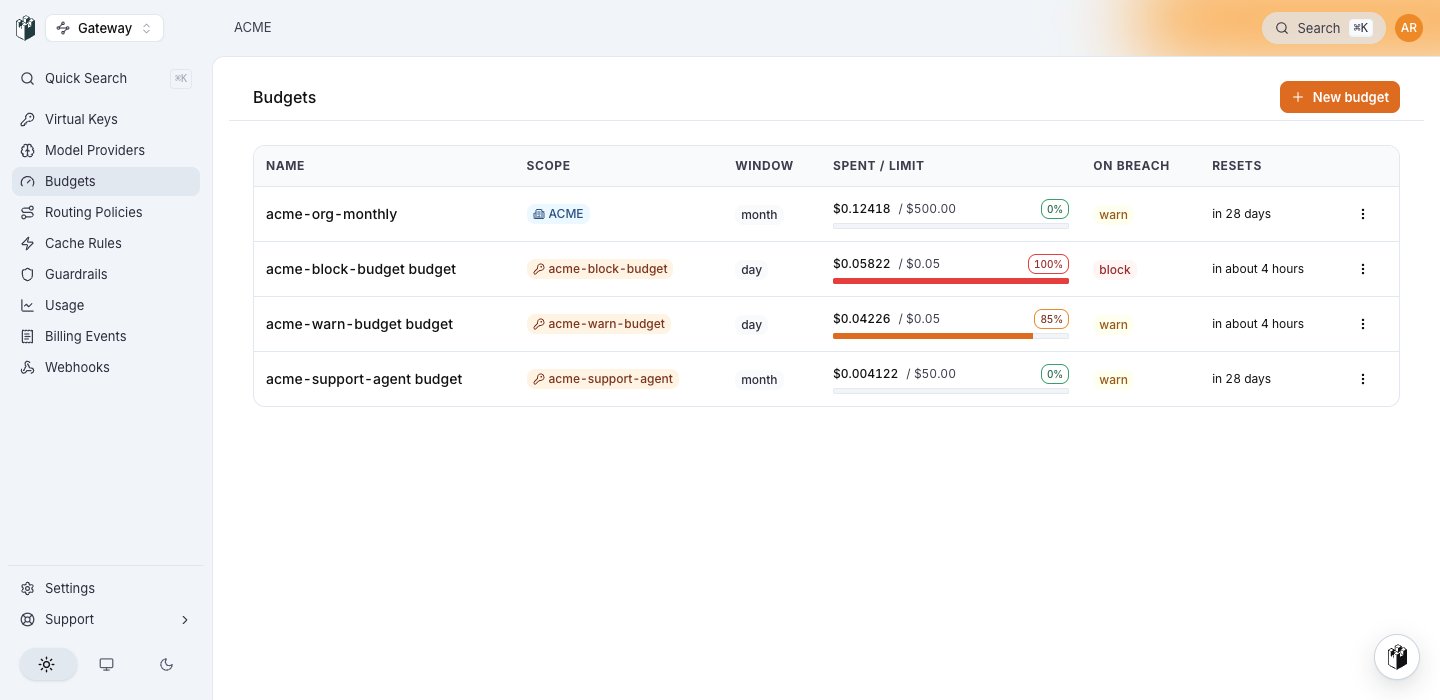
Budgets list

The budgets list: one row per budget across every dimension, each with its utilization bar and reset.

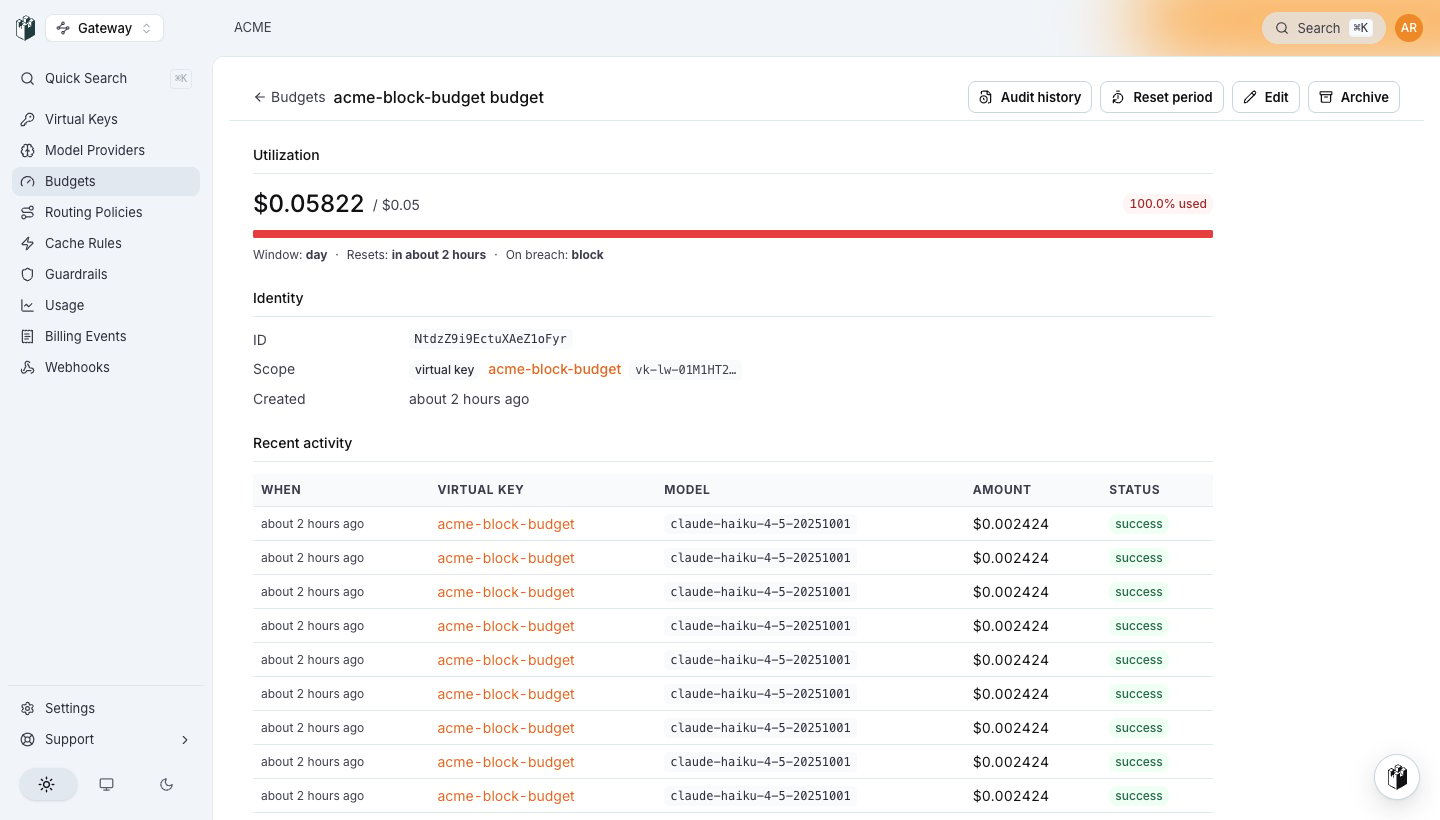
/gateway/budgets lists every budget with a utilization bar, its cap, and what remains. The bar and its percentage badge are colour-graded, so “which budgets are hot” is a one-glance read, and the Resets column shows a relative time with the exact UTC timestamp on hover. Clicking a row opens the detail page: utilization, enforcement mode, the resolved scope target, a link to this budget’s audit history, and the 20 most recent debits with amount, model, originating key, and the gateway request id for trace search.
Breached budget detail

A breached budget's detail page: full utilization, the enforcement mode, and the debits that consumed it.

/gateway/usage pairs with it for the time series: spend by day, top virtual keys, and a This month preset covering the same UTC month-to-date window the keys list reports.
Usage this month

Usage on the This month preset, filtered to one key: the same window and the same figures as the spend column that linked here.

The same figures over the API:

How spend is counted

Gateway operations are debited after the response completes, using the provider-reported token counts. Every debit carries a gateway_request_id and is idempotent by that id, so a retry or a redelivered batch never double-bills.
  1. The gateway admits the request before any budget or guardrail gating runs, recording who it belongs to. Admission is a local, non-blocking write to a bounded on-disk spool, so the request path never waits on the control plane.
  2. The gateway streams the response. When it closes, it records the provider’s token counts as a confirmation, or the failure with its error class. Both go to the same spool.
  3. A background drainer ships spooled batches to the control plane, which prices each outcome once from tokens times the pricing catalog.
  4. The debits process resolves every applicable budget and writes one ledger row per budget, rolled up by a materialised view. It is the only writer of that ledger.
  5. The same debit emits a change event, so the gateway drops its cached bundle for that project and the next request enforces against fresh spend.
Because admission happens before gating, a request the gateway refused is a record rather than a silence. Those rows land with the reason (PROVIDER_ERROR, or BLOCKED_BY_GUARDRAIL) and show in a budget’s activity list, but they do not count toward a cap: only successful requests accrue enforcement spend. A platform failure should be visible to you without charging your customer for it.The pre-request check. Before dispatching, the gateway evaluates the key’s in-memory budget snapshot, which arrives baked into its cached bundle. No control-plane round trip on the hot path: a block scope with nothing remaining is rejected outright, saving the provider spend and the round trip, and anything at or over 80% is allowed and flagged as a warning.The exception is an attributed-user template, where one row governs a separate allowance for every end user the anchor will ever see. That fan-out cannot be baked into a bundle, so the gateway reads the request’s own bucket from the control plane, cached 15 seconds per (budget, end user). A bucket it cannot read skips that scope: unreadable allows, it never blocks.The stale-snapshot trade-off. Because the check is local and the snapshot lags the ledger by one refresh, two replicas can each see spent=$24.90 / limit=$25.00 and both admit a 0.50request,producing0.50 request, producing 25.80 against a $25 cap. This is deliberate: a control-plane call on every near-limit request would put the gateway’s availability at the mercy of the control plane, and the overshoot is bounded by one refresh interval of traffic. Precheck is permissive by design, so a control-plane outage degrades enforcement accuracy, never availability, and spend reconciles once the ledger catches up.What “USD cost” means. Tokens times unit price, per provider, from their published pricing. Cache reads and writes are priced separately per provider: Anthropic cache reads are about 10% of regular input tokens and cache writes 125%. See Caching passthrough.
The ClickHouse ledger is the primary read wherever it is enabled; the Postgres spentUsd column is the fallback for self-hosted installs without it. A 1budgetblocksat1 budget blocks at 1 of spend on either.

Permissions

See RBAC.

Trace attributes

  • langwatch.cost_usd, cost of this single request.
  • langwatch.budget.breached_scope, present when the request was blocked; format scope:window (for example project:month).
  • langwatch.budget.warnings, comma-separated scope:pct_used entries for soft breaches.
Last modified on August 15, 2026