

Before you start
Do this once as an organization owner or admin. After it, every member signs in from the LangWatch CLI and gets a personal virtual key that routes through your providers, under your routing policy and your budgets. You need:- The owner or admin role on the LangWatch organization. The Admin role holds every gateway permission. A Member can create and rotate virtual keys and read every gateway page, and cannot change providers, routing policies, budgets or cache rules.
- One API key or credential set per provider you want to make available. The credential fields per provider are on Providers.
Add a model provider
1
Open Settings > Model Providers
Go to Settings > Model Providers (
/settings/model-providers), also listed as Model Providers in the AI Gateway sidebar. Click Add Model Provider and pick the provider from the menu.2
Paste the credentials and pick the scope
Fill the credential fields for that provider, then pick the scopes the credential serves. A provider is attached to the organization, to a team, to a project, or to several of these at once.A virtual key reaches every provider attached to its own scope and to the scopes above it, so a key on a project reaches that project’s providers, its team’s and the organization’s. Which of them serves a request is the routing policy’s order, and the fallback priority below when the key has no policy.Scope is fixed after you save. To move a credential to another scope, delete it and create it again.Click Save, then open the row menu and click Test Connection to confirm the credential works.
3
Set the routing handle and the gateway options
Open the row menu again and click Edit Provider.Routing handle names this one provider row in a model string. With a handle of
eu, a request reaches this row as eu/<model>. Without one, the provider family name is the prefix, and a key with two rows of the same family routes by the chain order instead. A handle is lowercase, up to 32 characters, and unique in the organization.Expand Advanced (Gateway) for the rest:Create a routing policy
Open AI Gateway > Routing Policies (/gateway/routing-policies) and create a policy. The policy decides which providers a key routes through and in what order, what the model tiers resolve to, and which models, tools and addresses a request may name.
Tick Make this the default where it applies so new keys in that scope pick it up, or attach it per key under AI Gateway > Virtual Keys, Edit, Routing. A key with neither runs in routing mode none, and the policy’s restrictions never apply to it.
Expand Restrictions and add one rule now, so you have something to test at the end. Under Tools, put ^shell_.* in the Refuse box. Any request that declares a tool whose name starts with shell_ is then refused before it reaches a provider.
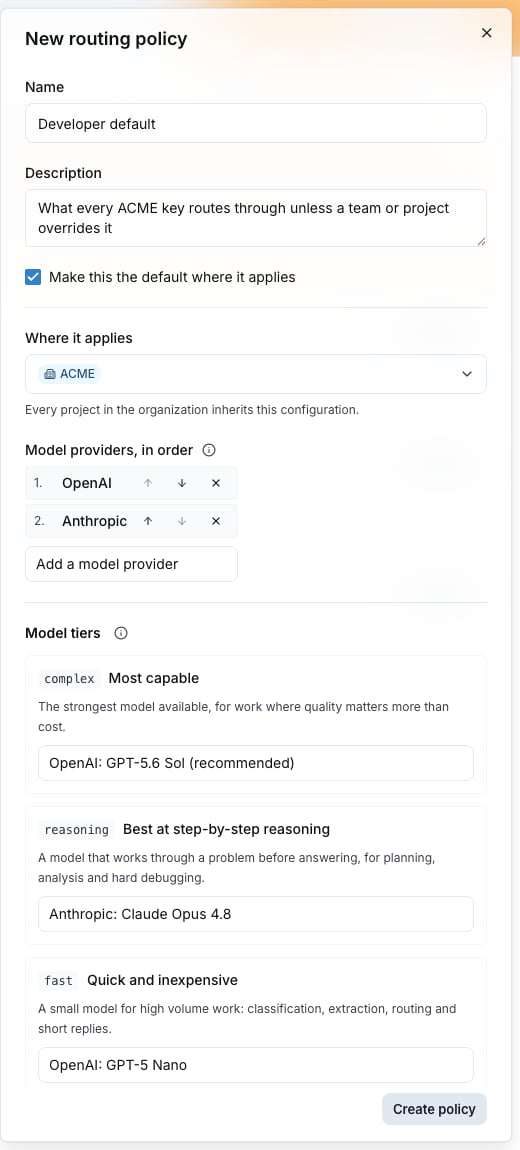
The policy drawer: where it applies, the providers in order, and the model tiers.
Set budgets
Open AI Gateway > Budgets (/gateway/budgets) and create a budget. A budget caps spend on a scope: the organization, a team, a project, one virtual key, one member, or a group. Every request is checked against every budget that applies to it.
Set at least one budget before you tell members to sign in. A key with no budget still serves traffic, and no limit stops it.
Also check: Budgets for the scopes, the windows and the breach behavior.
Give members their keys
There is no switch to turn personal keys on. A member runslangwatch login --device and approves the device in the browser, which creates the device session only. The personal virtual key is issued on the first tool run that takes the gateway path. If the organization has no model provider the member can reach, that run stops with 409 no_eligible_providers and points at Settings > Model Providers, and no key is created.
To choose which coding tools and which providers members see on their portal, open Governance > Inventory (/governance/inventory) and edit the Catalog tab.
Also check: Personal keys for what the member sees.
Verify with one request
Mint a key for yourself and send one completion through it.- Open Configure in your personal workspace (
/me/configure), click Add a new key, and copy the secret. It is shown once. - Send the request:
- Open AI Gateway > Usage (
/gateway/usage) for the request and its cost.
200 with an OpenAI-shaped body means the credential and the key resolve. It does not prove the policy applies. Check that the key’s Routing section names the policy, then send a request that declares the tool the policy refuses:
403 with "code": "policy_violation" and the message tool "shell_exec" is blocked by policy. If a request is refused unexpectedly, Troubleshooting maps the error codes to their cause.