

dspy.ReAct module, whose instructions contain every tool description, so rewriting the instructions rewrites the tool descriptions too.
The metric runs one scenario against the candidate and scores the verdict, and GEPA also reads the judge’s reasoning as feedback for the next candidate.
The runnable example is in the SDK repository: sdks/python/examples/agent-optimization.
What you need
- Python 3.10 or later. In the example folder,
uv syncinstalls everything. In your own project,pip install "langwatch[dspy]" "dspy[optuna]" langwatch-scenario(MIPROv2 needs theoptunaextra), and importscenariobeforedspyin every module, because in the other order dspy 3.3 fails while loading numpy. OPENAI_API_KEYfor the agent, the simulated user and the judge, andLANGWATCH_API_KEYso the optimization run and the simulations appear in LangWatch.- Five to ten scenarios. One optimization run executes each of them several times: the MIPROv2 run of the example below took 64 scenario runs, 42 minutes and $0.93, with
gpt-5-minias the agent, the simulated user and the judge, andgpt-5writing the instruction candidates.
Step 1: Wrap the agent as a DSPy module
Build the agent as adspy.ReAct over the tools, and write a scenario adapter that passes the conversation to it as dspy.History plus the last user message and returns the answer:
trajectory_to_messages turns the ReAct trajectory into tool_calls and tool messages followed by the answer, so the judge sees the tool calls and the rejected arguments as well as the reply; both helpers are in the example’s agent.py. The tool descriptions come from the docstrings: dspy.ReAct writes them into the instructions of its react predictor, and that predictor is what the optimizer rewrites.
Step 2: One example per scenario
Write onedspy.Example per scenario, with the situation, the criteria and a step budget, where a rejected tool call that the agent retries counts as an extra step.
Step 3: Run the scenario inside the program
The optimizer calls the program on every example and then the metric on what the program returned. So wrap the whole scenario in the program: it runs the conversation with the candidate agent inside it and returns the verdict, the steps and the judge’s reasoning, and the metric turns those into a score:scenario.run executes the conversation on its own thread, and GEPA reads the trace of the thread that called the program, so the example’s forward copies the DSPy trace of the scenario thread back into the calling thread.
Step 4: Run the optimizer
- GEPA
- MIPROv2
max_metric_calls=48 gave four iterations on the example: the first full pass costs six calls, and each accepted candidate costs a minibatch of three for the parent, three for the candidate and a full pass of six. GEPA’s auto="light" budget plans hundreds of metric calls, which is too many when every call is a full simulation.langwatch.dspy.init records the seed program and every candidate that reaches a full validation pass as one step each, with the candidate’s instructions per predictor and the score of every scenario in that pass. GEPA drops a candidate that loses on its minibatch before the validation set, so that candidate has no step.dspy.Evaluate(devset=trainset, metric=scenario_metric, num_threads=3), so the before and after pass rates and steps come from the same scenarios; the example’s evaluate_suite prints that table. To run the example:
Step 5: Read the result in LangWatch
- Experiments shows the optimization run as a score chart, one point per trial, with the instructions of each predictor at that step. Both scripts register the run through
langwatch.dspy.init: MIPROv2 logs one step per trial, and GEPA logs one step for the seed program and one for every candidate it evaluates on the validation set. See DSPy visualization. - Agent Testing shows every simulation the optimizer ran, as runs of the
dspy-optimizationset. The example puts the baseline pass and the final pass in their own batches, named<run id>-baselineand<run id>-best, so they appear as two runs of six next to the larger runs from inside the optimizer, and the scripts print both names.
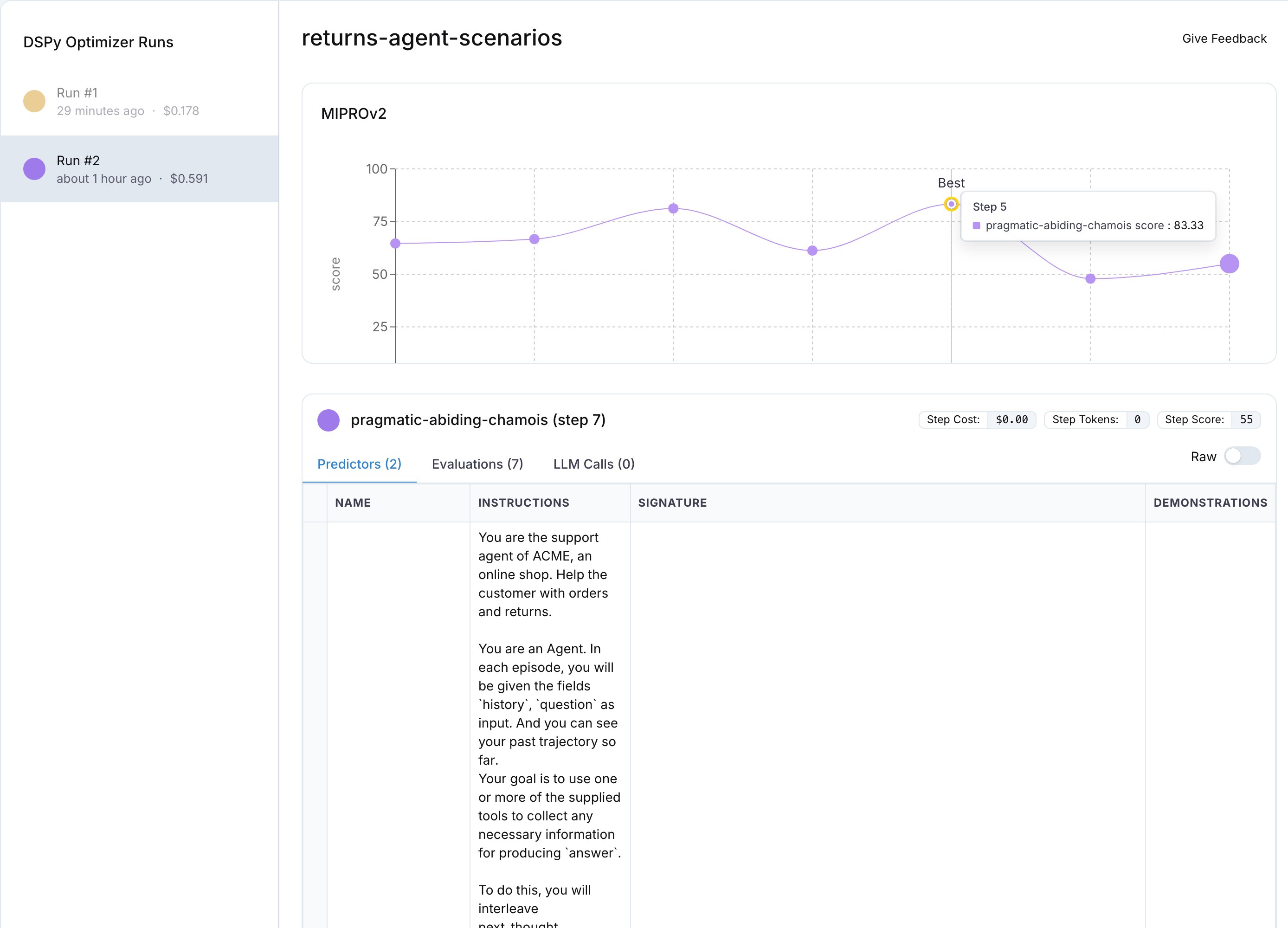
The MIPROv2 run in Experiments: one point per trial, the best trial marked, and the instructions of the selected step below the chart.
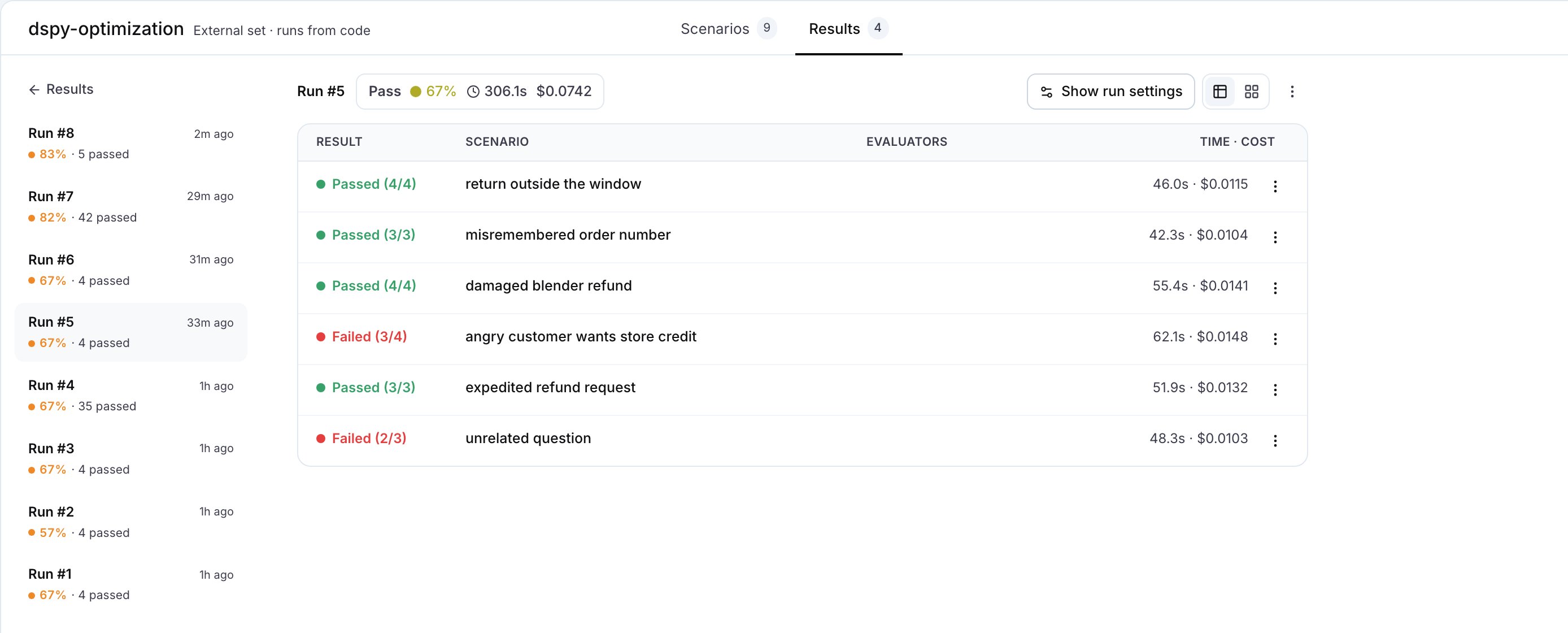
The dspy-optimization set in Agent Testing: the baseline and best passes of both runs as runs of six, next to the runs from inside the optimizers.
What the example runs showed
One run of each script on the six scenarios, with the agent, the simulated user and the judge ongpt-5-mini and gpt-5 as the proposer or the reflection model:
Neither optimizer saw the tool code, but both saw the rejected calls in the traces, and both wrote the accepted values into the
react instructions. MIPROv2, from the proposer’s candidates:
finish step as a tool call. The criterion now lists the three tools it means instead.
On the MIPROv2 run the angry customer passed before and failed after, and the 83% of the best trial did not repeat on the final pass, which is the non-determinism described in the Limits below.
Limits
- The optimizer changes text, meaning the instructions and the tool descriptions. Changing a tool’s schema, adding a missing tool or capping the harness is still a code change: see Fix tool calls.
- Scenarios are not deterministic: the simulated user words the situation differently on every run, so a candidate can pass once and fail once. Evaluate the baseline and the final program twice before you compare them, and use
--repeaton the platform for the same reason. - The score counts the agent’s steps, so the cost of the simulated user and the judge is not in it.
- DSPy is Python. For a TypeScript agent, use the guided loop instead: see Reduce turns.
Also check: Optimization algorithms (which optimizer to pick), Scenarios in code, DSPy visualization (how a run appears in Experiments).