

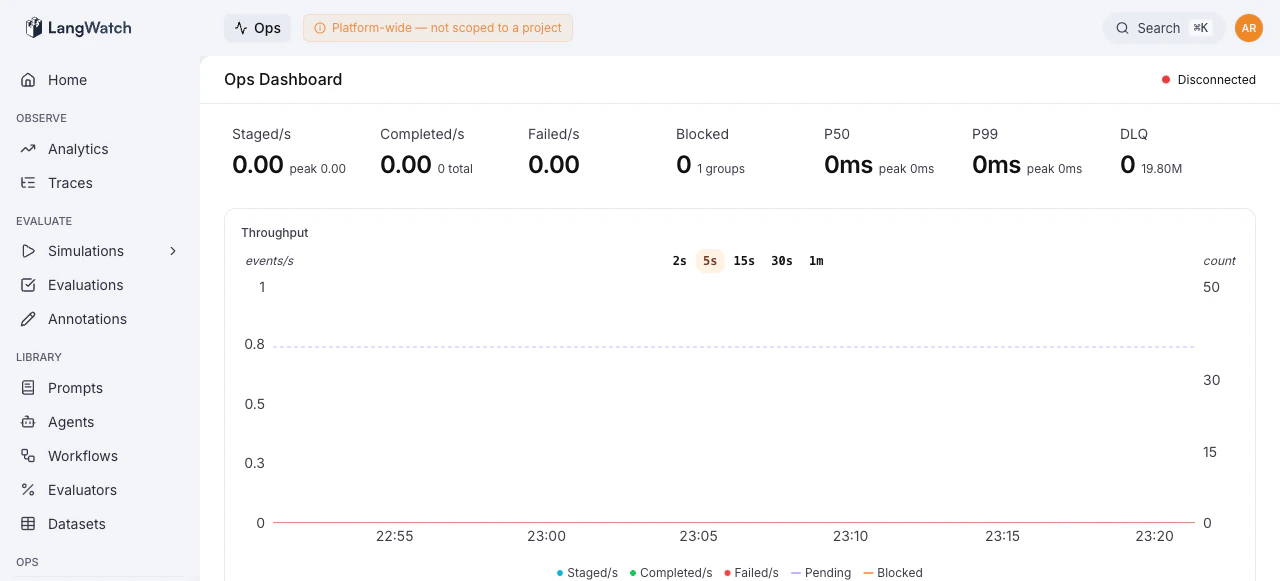
/ops) is a platform-wide operations interface built for teams running LangWatch on their own infrastructure. It gives operators real-time visibility into the event-sourcing pipeline, queue health, processing throughput, error clusters, and the tools to act on problems without touching the database or restarting pods.
When to Use Ops
Feature Overview
Dashboard
Real-time throughput, latency, error rates, and pipeline health at a glance. Powered by
Server-Sent Events with automatic polling fallback.
Queue Management
Error groups, blocked queues, dead letter queue redriving, draining, and pipeline pause/unpause
controls.
Projection Replay
Rebuild projection state by replaying events from ClickHouse. Supports bulk replay across
tenants, single-aggregate debugging, and dry runs.
Deja View
Time-travel debugger for event-sourced aggregates. Inspect the full event history and compute
any projection’s state at any point in time.
The Foundry
Interactive trace playground for building, visualizing, and sending synthetic traces to any
project. Useful for testing ingestion pipelines and reproducing issues.
Who can use Ops
Ops access comes from the deployment’sADMIN_EMAILS allow-list. Set it to a
comma-separated list of trusted operator email addresses:
ops:view or ops:manage, does not grant Ops
access. The console uses those permission names to distinguish reads and
changes, but the current allow-list grants the operator both.
The Backoffice pages also check the platform-admin allow-list. Use
organization roles for customer access to teams, projects and
organization settings.
Identity and directory support
Organization administrators manage their own provider in Settings > Authentication, and people and assignments in Settings > Directory. Use the Backoffice pages when an installation operator needs to investigate across organizations.
Pausing SSO stops new sign-ins through the connection. It leaves existing
sessions and SCIM provisioning in place. Removing a connection also stops
SCIM requests immediately and later revokes that connection’s tokens. It does
not remove members or end their sessions. To offboard a person, use Directory
or the identity provider’s SCIM deactivation before removing the connection.
See SSO removal.
For a migration, read the per-organization result. Held means the work ran
but its parity checks found differences. Parked means the attempt failed
and will be retried. Finalized means the organization completed that
migration. A run that is waiting for an earlier migration has not changed the
organization yet. Do not treat starting a migration as proof it finished.
Identity and access migrations run automatically after each upgrade; see
Automatic identity and access migration.
Check every required migration, including users as well as organizations.
Credential repair is recurring and does not finalize; the one-time backfills
must finalize.
Architecture Context
The Ops Console sits on top of LangWatch’s event-sourcing pipeline:- Commands enter Redis queues from the ingestion API
- Workers consume commands, emit events, and update projections in ClickHouse
- The Ops Console reads queue state from Redis and event history from ClickHouse, and can issue control actions (unblock, drain, pause, replay) back to the queues