

When to use Saved Evaluators:
- You want to reuse the same evaluation configuration across multiple places
- You prefer configuring evaluators via UI rather than code
- You want non-technical team members to create and manage evaluations
- You need consistent evaluation settings across your team
- Built-in Evaluators - Use evaluators directly without platform setup
- Custom Scoring - Send scores from your own evaluation logic
Creating a Saved Evaluator
Via the Platform UI
- Go to Evaluators in your LangWatch project
- Click New Evaluator
- Select the evaluator type (e.g., LLM Boolean, PII Detection)
- Configure the settings (model, prompt, thresholds, etc.)
- Give it a descriptive name and save
Via the Evaluators Page
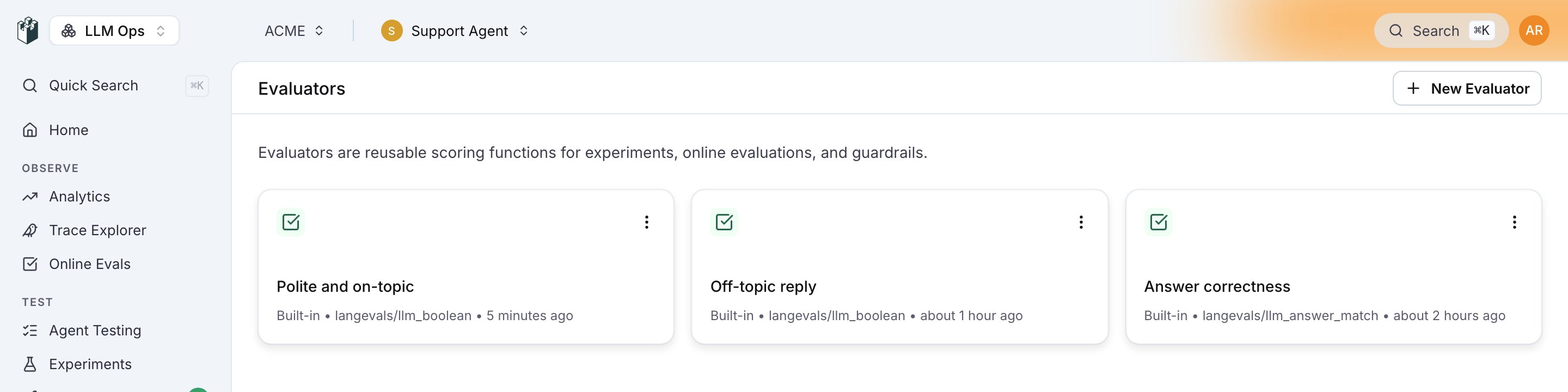
/{project}/evaluators.
Custom (Code) evaluators
A code evaluator is a saved evaluator whose logic is your own Python. Create one on the Evaluators page with New Evaluator → Custom (Code): declare its inputs (for exampleoutput and expected_output) and write a Code class whose __call__ takes those inputs and returns a dictionary with any of passed, score, label and details.
- Run it like any saved evaluator:
POST /api/evaluations/evaluators/{slug}/evaluate, withdataholding one value per declared input. - Find it:
GET /api/evaluatorslists it withtype: "code", andGET /api/evaluators/{idOrSlug}returns its code and inputs inconfig. - Monitor with it: run it on incoming traces with
POST /api/monitors, sending the evaluator’s id asevaluatorIdandcode/<evaluatorId>ascheckType, plusmappingsfrom trace fields to its inputs.
POST /api/evaluators only creates built-in evaluator types.
Using Saved Evaluators
Saved evaluators are referenced using theevaluators/{slug} format, where {slug} is the unique identifier assigned when you create the evaluator.
Finding Your Evaluator Slug
- Go to your saved evaluator on the platform
- Click the ⋮ menu → Use via API
- Copy the slug from the code examples
In Experiments
In Online Evaluation
As Guardrails
Via cURL
Saved vs Built-in Evaluators
Best Practices
Naming Conventions
Use descriptive, consistent names for your saved evaluators:- ✅
tone-checker-formal - ✅
pii-detection-strict - ✅
answer-quality-v2 - ❌
test1 - ❌
my-evaluator
When to Save an Evaluator
Save an evaluator when you:- Use the same configuration in multiple places
- Want to manage settings from the UI
- Need non-developers to configure evaluations
- Want to version control evaluation criteria separately from code