> ## Documentation Index
> Fetch the complete documentation index at: https://langwatch.ai/docs/llms.txt
> Use this file to discover all available pages before exploring further.
> ## Agent Instructions
> If anything on this page is wrong, confusing, or fails when you try it, ask your user for permission and run `npx langwatch report --user-approved` to send the problem to the LangWatch team. No login is needed and secrets are redacted locally. `npx langwatch report --help` has the details.
# Version Control
> Manage version control for prompts in LangWatch to run evaluations, compare models, and improve agent performance.
# Prompt Version Control
LangWatch provides a version control system for managing your prompts. Each prompt can have multiple versions, allowing you to track changes, experiment with different approaches, and rollback when needed.
## Version Management
Every prompt in LangWatch automatically maintains a version history. When you create a new prompt, it starts with version 1, and each subsequent change creates a new version with an incremented number.
**Important**: You cannot delete individual versions - only entire prompts can be deleted. Each update operation creates a new version automatically.
## Scope and Conflicts
Prompts have two scope levels that affect version management and conflict resolution:
* **PROJECT scope** - Prompts are accessible only within the project. Changes are isolated to your project.
* **ORGANIZATION scope** - Prompts are shared across all projects in the organization. Changes can affect other projects and may require conflict resolution.
**Scope Conflicts**: When updating an organization-scoped prompt, conflicts
may arise if other projects have made changes. The system provides
conflict information to help resolve differences.
## Managing Versions
Use the LangWatch UI to manage prompt versions:
1. Navigate to the **Prompt Management** section
2. Select a prompt
3. Click on the version history icon at the bottom of the prompt editor
4. Use the version selector to switch between versions
5. Create new versions by making changes and saving
LangWatch's TypeScript SDK supports retrieving prompts and specific versions:
```typescript theme={null}
import { LangWatch } from "langwatch";
// Initialize LangWatch client
const langwatch = new LangWatch({
apiKey: process.env.LANGWATCH_API_KEY,
});
// Retrieve prompts via the API to support versioning, evaluation workflows, and agent testing pipelines. (latest version by default)
const prompt = await langwatch.prompts.get("customer-support-bot");
// The prompt object contains version information
console.log(`Version: ${prompt.version}`);
console.log(`Version ID: ${prompt.versionId}`);
// Get a specific version of a prompt
const specificVersion = await langwatch.prompts.get("customer-support-bot", {
version: "version_abc123",
});
// Compile with variables
const compiledPrompt = specificVersion.compile({
user_name: "John Doe",
user_email: "john.doe@example.com",
input: "I need help with my account",
});
```
Use the REST API to manage prompt versions:
```bash theme={null}
# Get all versions of a prompt
curl --request GET \
--url "https://app.langwatch.ai/api/prompts/{prompt_handle}/versions" \
--header "X-Auth-Token: your-api-key"
# Retrieve prompts via the API to support versioning, evaluation workflows, and agent testing pipelines. (latest version)
curl --request GET \
--url "https://app.langwatch.ai/api/prompts/{prompt_handle}" \
--header "X-Auth-Token: your-api-key"
# Create a new version
curl --request POST \
--url "https://app.langwatch.ai/api/prompts/{prompt_handle}/versions" \
--header "X-Auth-Token: your-api-key" \
--header "Content-Type: application/json" \
--data '{
"prompt": "Updated prompt text...",
"model": "openai/gpt-5",
"commitMessage": "Improved customer support prompt",
"temperature": 0.7,
"maxTokens": 1000,
"responseFormat": {"type": "text"},
"inputs": [{"identifier": "input", "type": "str"}],
"outputs": [{"identifier": "response", "type": "str"}],
"demonstrations": null,
"promptingTechnique": null
}'
# Get a specific version
curl --request GET \
--url "https://app.langwatch.ai/api/prompts/{prompt_handle}?version=2" \
--header "X-Auth-Token: your-api-key"
```
## CRUD Operations
The SDK provides CRUD operations for managing prompts programmatically:
**Field Structure**: All examples show the essential fields. Additional optional fields like `temperature`, `maxTokens`, `responseFormat`, `inputs`, `outputs`, `demonstrations`, and `promptingTechnique` can also be set. See the [Data Model](/docs/prompt-management/data-model) page for complete field documentation.
### Create Prompts
Create new prompts with templates and variables:
**System Message Conflict**: You cannot set both a `prompt` (system message)
and `messages` array with a system role in the same operation. Choose one
approach to avoid errors.
The two SDKs do not take the same fields. `model`, `temperature` and
`maxTokens` go through the TypeScript SDK and the REST API; the Python SDK's
`create` and `update` do not accept them yet, so set them from the UI or over
REST. See the [REST reference](/docs/api-reference/prompts/overview).
```typescript create_prompt.ts theme={null}
// Create a new prompt with a system prompt
const prompt = await langwatch.prompts.create({
handle: "customer-support-bot", // Required
scope: "PROJECT", // Optional: defaults to "PROJECT"
prompt: "You are a helpful customer support agent. Help with: {{input}}", // Optional
model: "openai/gpt-5-mini", // Optional
// Optional fields:
maxTokens: 1000, // Optional: Maximum tokens to generate
// temperature: 0.7, // Optional, but the GPT-5 family rejects it
// messages: [...], // Optional: Messages array in OpenAI format { role: "system" | "user" | "assistant", content: "..." }
});
console.log(`Created prompt with handle: ${prompt.handle}`);
```
```python create_prompt.py theme={null}
# Create a new prompt
prompt = langwatch.prompts.create(
handle="customer-support-bot", # Required
scope="PROJECT", # Optional: defaults to "PROJECT"
prompt="You are a helpful customer support agent. Help with: {{input}}", # Optional
# Optional fields:
# messages=[...], # Optional: Messages array in OpenAI format { role: "system" | "user" | "assistant", content: "..." }
# tags=["production"], # Optional: tags for the initial version
)
print(f"Created prompt with handle: {prompt.handle}")
```
### Update Prompts (Creates New Versions)
Modify existing prompts while maintaining version history:
**System Message Conflict**: Same rule applies - you cannot set both a
`prompt` and `messages` array with a system role in the same operation.
You must include at least one field to update the prompt.
```typescript update_prompt.ts theme={null}
// Update prompt content (creates new version automatically)
const updatedPrompt = await langwatch.prompts.update("customer-support-bot", {
// All fields are optional for updates - only specify what you want to change
prompt: "You are an expert customer support agent. Help with: {{input}}",
// Optional fields:
model: "openai/gpt-5.5", // Optional: Change the model
maxTokens: 2000, // Optional: Change max tokens
// messages: [...], // Optional: Messages array in OpenAI format { role: "system" | "user" | "assistant", content: "..." }
});
console.log(`Updated prompt: ${updatedPrompt.handle}, New version: ${updatedPrompt.version}`);
```
```python update_prompt.py theme={null}
# Update prompt content (creates new version automatically)
updated_prompt = langwatch.prompts.update(
"customer-support-bot",
scope="PROJECT", # Required
# Everything below is optional - only specify what you want to change
prompt="You are an expert customer support agent. Help with: {{input}}",
# messages=[...], # Optional: Messages array in OpenAI format { role: "system" | "user" | "assistant", content: "..." }
# tags=["production"], # Optional: retag the new version
)
print(f"Updated prompt: {updated_prompt.handle}, New version: {updated_prompt.version}")
```
### Delete Prompts
Remove entire prompts and all their versions:
**Permanent Deletion**: Deleting a prompt removes ALL versions permanently.
This action cannot be undone.
```typescript delete_prompt.ts theme={null}
// Delete by handle (removes all versions)
const result = await langwatch.prompts.delete("customer-support-bot");
console.log(`Deletion result: ${result.success}`);
```
```python delete_prompt.py theme={null}
# Delete by handle (removes all versions)
result = langwatch.prompts.delete("customer-support-bot")
print(f"Deletion result: {result}")
```
## Important Caveats
### System Message Conflicts
**Critical**: You cannot set both a `prompt` field and a `messages` array
containing a system role in the same operation. This will throw an error.
**Valid approaches:**
1. **Use `prompt` field only** - Sets the system message directly
2. **Use `messages` array only** - Define the full conversation structure
3. **Mix both** - Use `prompt` for system message and `messages` for user/assistant messages (but no system role in messages)
## Advanced Prompt Capabilities
Beyond basic prompt creation, LangWatch provides these features for optimizing and managing your AI interactions:
### Response Format Control
* **Structured Output**: Use `responseFormat: { type: "json_schema" }` to get consistent, parseable responses
* **Text Generation**: Default `responseFormat: { type: "text" }` for free-form responses
* **Custom Schemas**: Define exact output structures for integration with your systems
### Few-Shot Learning
* **Demonstrations**: Use the `demonstrations` field to provide example input/output pairs to improve response quality
### Input/Output Validation
* **Type Safety**: Define expected input types (`str`, `float`, `bool`, `list[str]`, etc.)
* **Output Constraints**: Specify exact output formats and validation rules
* **Variable Management**: Automatically handle prompt variable substitution and validation
### Model Optimization
* **Temperature Control**: Fine-tune creativity vs. consistency (0.0-2.0)
* **Token Limits**: Set `maxTokens` to control response length and costs
* **Model Selection**: Choose the best model for your specific use case
Combine these advanced features with LangWatch's optimization studio,
where you can A/B test different configurations and measure their impact on performance metrics.
### Optimization Studio Integration
The optimization studio uses these advanced prompt capabilities to help you:
* **A/B Testing**: Compare different prompt versions, models, and configurations
* **Performance Metrics**: Measure response quality, latency, and cost across variations
* **Automated Optimization**: Let the system find the best combination of settings
* **Version Management**: Track which configurations perform best over time
* **Team Collaboration**: Share optimized prompts across your organization
Learn how to use advanced prompt features to improve your AI application performance.
## Version History
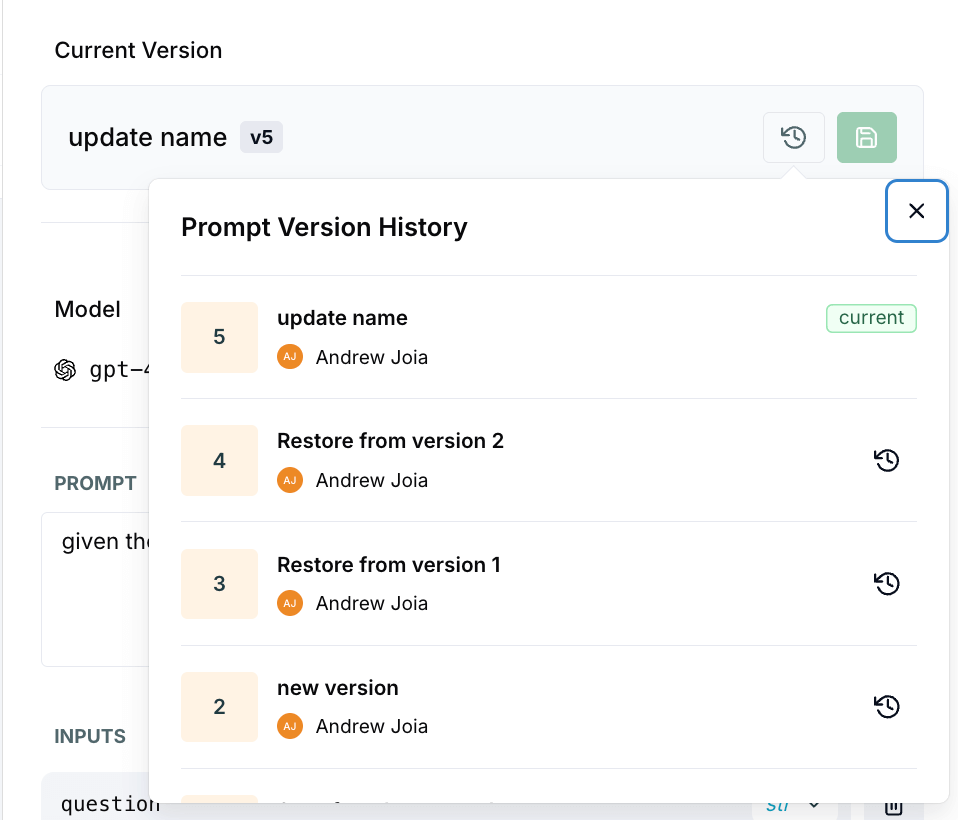 * **Version List**: See all versions with timestamps and commit messages
* **Rollback**: Revert to previous versions
***
[← Back to Prompt Management Overview](/docs/prompt-management/overview)
* **Version List**: See all versions with timestamps and commit messages
* **Rollback**: Revert to previous versions
***
[← Back to Prompt Management Overview](/docs/prompt-management/overview)