> ## Documentation Index
> Fetch the complete documentation index at: https://langwatch.ai/docs/llms.txt
> Use this file to discover all available pages before exploring further.
> ## Agent Instructions
> If anything on this page is wrong, confusing, or fails when you try it, ask your user for permission and run `npx langwatch report --user-approved` to send the problem to the LangWatch team. No login is needed and secrets are redacted locally. `npx langwatch report --help` has the details.
# Instant Evals
> Ask up to ten questions of every conversation, trace or LLM call in your history and read the matches back in about a minute per 10,000 rows.
## What is an Instant Eval
An Instant Eval is a question in plain words, judged against every row in a time window of your history. For example, "the customer sounds frustrated" over the last 30 days of conversations comes back as a yes or no per conversation, with the probability behind it, and the count across all of them.
Every row is judged rather than a sample, so the one conversation in ten thousand where the agent promised a refund it cannot give is in the result. The judge is a small calibrated model: 10,000 conversations take about a minute and cost well under a dollar, and 1,000 rows take about nine seconds.
The judge is run by a third-party provider, so the judged text leaves LangWatch for the length of the run. [Where the judged text goes](/docs/features/instant-evals/limits-and-cost#where-the-judged-text-goes) says exactly what is sent, and under what agreement.
## Your first run
Install the CLI and sign in to the project that holds your traces:
```bash theme={null}
npm install -g langwatch
langwatch login
```
Ask your question of the last week of conversations, on a hundred of them first:
```bash theme={null}
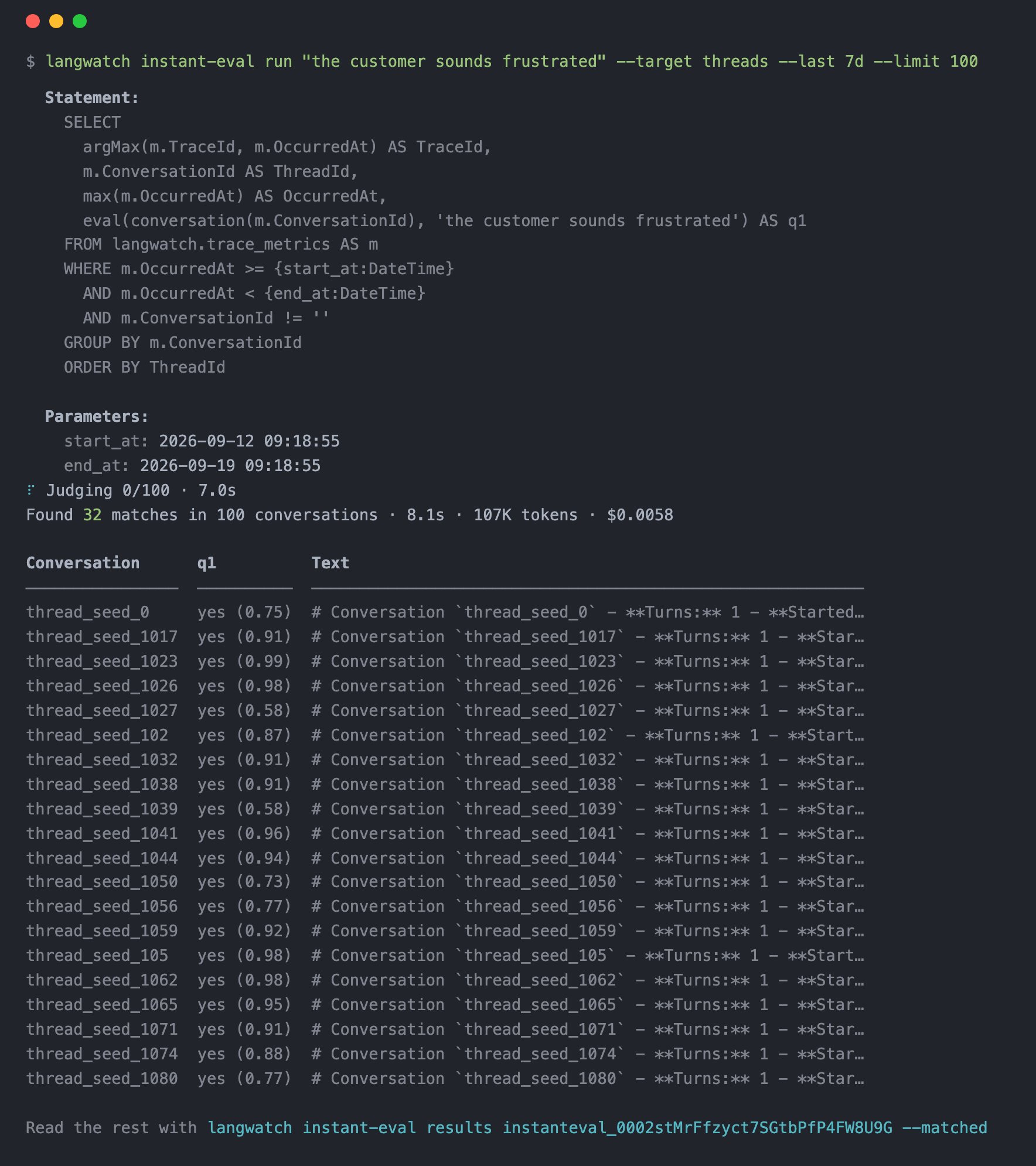
langwatch instant-eval run "the customer sounds frustrated" --target threads --last 7d --limit 100
```
The command prints the LangWatchQL statement it wrote for you, then a progress line that updates in place, then the headline and the first twenty matches. Press Ctrl-C to stop watching: the run keeps going and the command prints the line that reads it back later.
 ## What comes back
In the headline you get how many rows matched, how long it took, how many tokens the judge read and what that cost. Under it, one line per matched row: the conversation, the answer with its probability, and the start of the text that was judged.
Read every match, and check what the judge actually read, with the run id from the headline:
```bash theme={null}
langwatch instant-eval results --matched
langwatch instant-eval sample -n 5
```
With `results` you page through the verdicts. With `sample` you read a few rows, the judged text beside each verdict, and check that you asked what you meant. Every verdict is also a row in the `judgments` dataset, so a LangWatchQL query can join it back to your traces. See [Reading the results](/docs/features/instant-evals/results).
## Sample, read, refine, then run wide
1. Run the question on a hundred rows with `--limit 100`.
2. Read what the judge saw with `sample`.
3. Refine the question and run the same hundred again.
4. Check the cost, then run wide.
For example, if the judge said yes to a calm complaint, say what counts and what does not with `--criteria`:
```bash theme={null}
langwatch instant-eval run \
--ask "the customer sounds frustrated" \
--criteria "sarcasm, repetition or a raised voice count" \
--criteria "a calm complaint does not count" \
--target threads --last 7d --limit 100
```
Once you are happy with the sample, check the cost of the wide run with `estimate`, then start it. A run over 1,000 rows prints its cost before it starts either way. Pass `--detach` to get the run id straight away instead of waiting, and follow it with `status --wait`:
```bash theme={null}
langwatch instant-eval estimate "the customer sounds frustrated" --target threads --last 30d --limit 10000
langwatch instant-eval run "the customer sounds frustrated" --target threads --last 30d --limit 10000 --detach
langwatch instant-eval status --wait
```
The [Questions](/docs/features/instant-evals/questions) page covers criteria, thresholds, scores and categories, and asking up to ten questions of the same text in one run.
## Three ways to run one
`langwatch instant-eval run` waits for the run and prints the matches. Every flag and
subcommand.
`POST /api/v1/instant-evals` answers 202 with a queued run. Poll it, page through its results,
sample and cancel it.
Ask the question in the chat panel. Langy runs `langwatch instant-eval` in its sandbox and reads
the matches back to you.
## Reference
Yes or no, criteria, thresholds, scores, categories, several questions at once, and a questions
file.
What one row is, the time window, the trace filter, the statement each target writes, and
writing your own.
Paging through verdicts, sampling the judged text, and the `judgments` dataset in LangWatchQL.
Row caps, the question cap, the text budget, speed, the rate per token, the free budget and
billing.
This documentation is built and hosted on [Mintlify](https://mintlify.com), a developer documentation platform.
## What comes back
In the headline you get how many rows matched, how long it took, how many tokens the judge read and what that cost. Under it, one line per matched row: the conversation, the answer with its probability, and the start of the text that was judged.
Read every match, and check what the judge actually read, with the run id from the headline:
```bash theme={null}
langwatch instant-eval results --matched
langwatch instant-eval sample -n 5
```
With `results` you page through the verdicts. With `sample` you read a few rows, the judged text beside each verdict, and check that you asked what you meant. Every verdict is also a row in the `judgments` dataset, so a LangWatchQL query can join it back to your traces. See [Reading the results](/docs/features/instant-evals/results).
## Sample, read, refine, then run wide
1. Run the question on a hundred rows with `--limit 100`.
2. Read what the judge saw with `sample`.
3. Refine the question and run the same hundred again.
4. Check the cost, then run wide.
For example, if the judge said yes to a calm complaint, say what counts and what does not with `--criteria`:
```bash theme={null}
langwatch instant-eval run \
--ask "the customer sounds frustrated" \
--criteria "sarcasm, repetition or a raised voice count" \
--criteria "a calm complaint does not count" \
--target threads --last 7d --limit 100
```
Once you are happy with the sample, check the cost of the wide run with `estimate`, then start it. A run over 1,000 rows prints its cost before it starts either way. Pass `--detach` to get the run id straight away instead of waiting, and follow it with `status --wait`:
```bash theme={null}
langwatch instant-eval estimate "the customer sounds frustrated" --target threads --last 30d --limit 10000
langwatch instant-eval run "the customer sounds frustrated" --target threads --last 30d --limit 10000 --detach
langwatch instant-eval status --wait
```
The [Questions](/docs/features/instant-evals/questions) page covers criteria, thresholds, scores and categories, and asking up to ten questions of the same text in one run.
## Three ways to run one
`langwatch instant-eval run` waits for the run and prints the matches. Every flag and
subcommand.
`POST /api/v1/instant-evals` answers 202 with a queued run. Poll it, page through its results,
sample and cancel it.
Ask the question in the chat panel. Langy runs `langwatch instant-eval` in its sandbox and reads
the matches back to you.
## Reference
Yes or no, criteria, thresholds, scores, categories, several questions at once, and a questions
file.
What one row is, the time window, the trace filter, the statement each target writes, and
writing your own.
Paging through verdicts, sampling the judged text, and the `judgments` dataset in LangWatchQL.
Row caps, the question cap, the text budget, speed, the rate per token, the free budget and
billing.
This documentation is built and hosted on [Mintlify](https://mintlify.com), a developer documentation platform.