> ## Documentation Index
> Fetch the complete documentation index at: https://langwatch.ai/docs/llms.txt
> Use this file to discover all available pages before exploring further.
> ## Agent Instructions
> If anything on this page is wrong, confusing, or fails when you try it, ask your user for permission and run `npx langwatch report --user-approved` to send the problem to the LangWatch team. No login is needed and secrets are redacted locally. `npx langwatch report --help` has the details.
# RAG Visualization
> Visualize DSPy RAG optimization steps in LangWatch to better understand performance and support AI agent testing.
[ ](https://colab.research.google.com/github/langwatch/langevals/blob/main/notebooks/tutorials/dspy_rag.ipynb)
LangWatch tracks the optimization of a RAG application built with [DSPy](https://dspy-docs.vercel.app), step by step.
## DSPy RAG Module
The example RAG application is the sample app from the official DSPy documentation.
For more detail, see the [RAG tutorial](https://dspy-docs.vercel.app/docs/tutorials/rag).
Firstly, lets access the dataset of wiki abstracts that will be used for example RAG optimization.
```python theme={null}
import dspy
lm = dspy.LM('openai/gpt-5-mini')
colbertv2_wiki17_abstracts = dspy.ColBERTv2(url='http://20.102.90.50:2017/wiki17_abstracts')
dspy.configure(lm=lm, rm=colbertv2_wiki17_abstracts)
from dspy.datasets import HotPotQA
# Load the dataset.
dataset = HotPotQA(train_seed=1, train_size=20, eval_seed=2023, dev_size=50, test_size=0)
# Tell DSPy that the 'question' field is the input. Any other fields are labels and/or metadata.
trainset = [x.with_inputs('question') for x in dataset.train]
devset = [x.with_inputs('question') for x in dataset.dev]
len(trainset), len(devset)
```
Next step - to define the RAG module itself.
You can explain the task and what the expected outputs mean in this context that an LLM can optimize these commands later.
```python theme={null}
class GenerateAnswer(dspy.Signature):
"""Answer questions with short factoid answers."""
context = dspy.InputField(desc="may contain relevant facts")
question = dspy.InputField()
answer = dspy.OutputField(desc="often between 1 and 5 words")
class RAG(dspy.Module):
def __init__(self, num_passages=3):
super().__init__()
self.retrieve = dspy.Retrieve(k=num_passages)
self.generate_answer = dspy.ChainOfThought(GenerateAnswer)
def forward(self, question):
context = self.retrieve(question).passages
prediction = self.generate_answer(context=context, question=question)
return dspy.Prediction(context=context, answer=prediction.answer)
```
Finally, you can connect to LangWatch. After running this code snippet - you will get a link that will give you access to
an `api_key` in the browser. Paste the API key into your code editor popup and press enter - **now you are connected to LangWatch**.
```python theme={null}
import langwatch
langwatch.endpoint = "https://app.langwatch.ai"
langwatch.login()
```
Last step is to actually run the prompt optitmizer. In this example `BootstrapFewShot` is used and it will
bootstrap our prompt with the best demos from our dataset.
```python theme={null}
from dspy.teleprompt import BootstrapFewShot
from dspy import evaluate
from dotenv import load_dotenv
load_dotenv()
# Validation logic: check that the predicted answer is correct.
# Also check that the retrieved context does actually contain that answer.
def validate_context_and_answer(example, pred, trace=None):
answer_EM = evaluate.answer_exact_match(example, pred)
answer_PM = evaluate.answer_passage_match(example, pred)
return answer_EM and answer_PM
# Set up a basic teleprompter, which will compile our RAG program.
teleprompter = BootstrapFewShot(metric=validate_context_and_answer)
langwatch.dspy.init(experiment="rag-dspy-tutorial", optimizer=teleprompter)
# Compile!
compiled_rag = teleprompter.compile(RAG(), trainset=trainset)
```
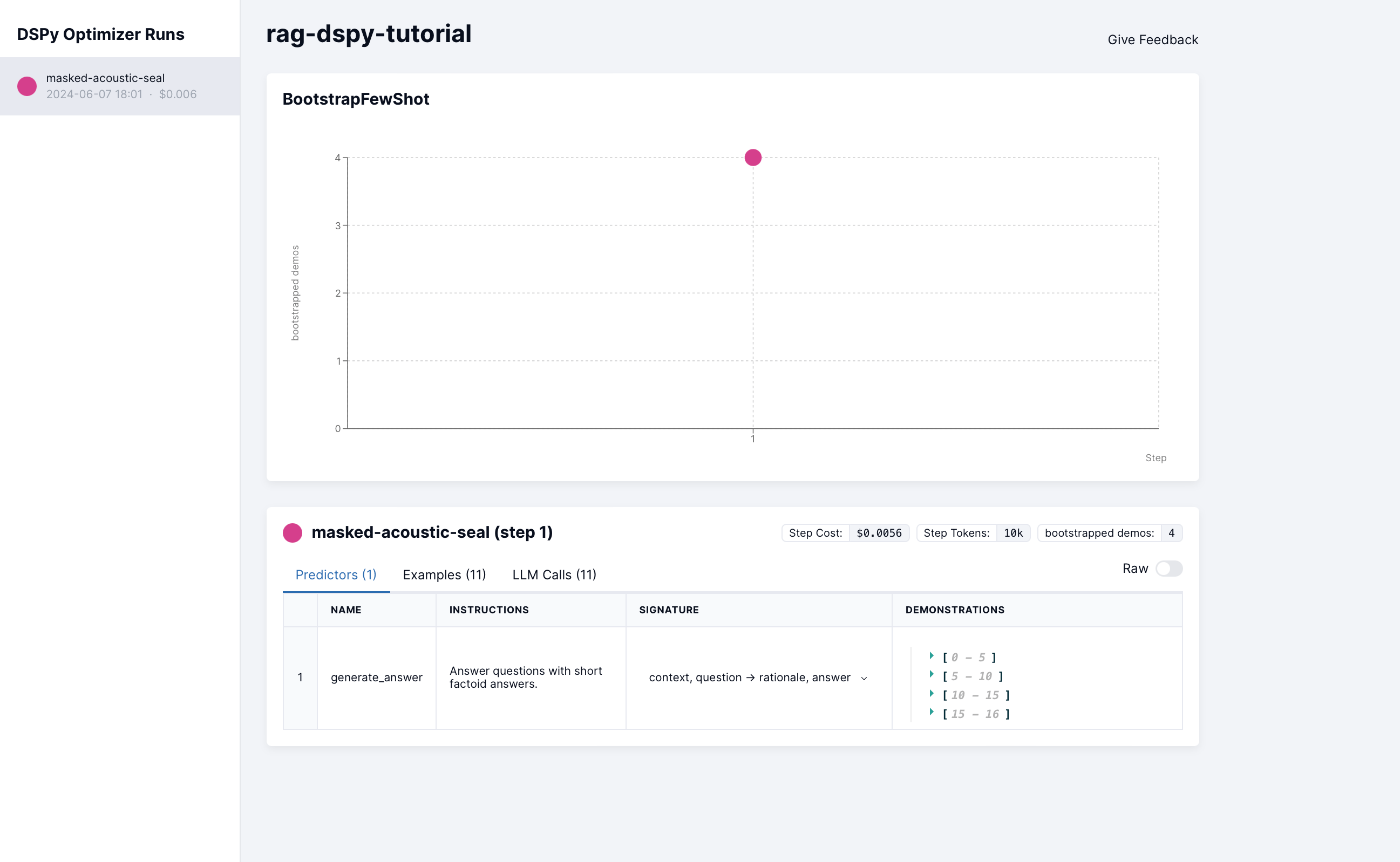
The result of optimization can be found on your LangWatch dashboard. On the graph you can see how many demos were boostrapped during the first optimization step.
](https://colab.research.google.com/github/langwatch/langevals/blob/main/notebooks/tutorials/dspy_rag.ipynb)
LangWatch tracks the optimization of a RAG application built with [DSPy](https://dspy-docs.vercel.app), step by step.
## DSPy RAG Module
The example RAG application is the sample app from the official DSPy documentation.
For more detail, see the [RAG tutorial](https://dspy-docs.vercel.app/docs/tutorials/rag).
Firstly, lets access the dataset of wiki abstracts that will be used for example RAG optimization.
```python theme={null}
import dspy
lm = dspy.LM('openai/gpt-5-mini')
colbertv2_wiki17_abstracts = dspy.ColBERTv2(url='http://20.102.90.50:2017/wiki17_abstracts')
dspy.configure(lm=lm, rm=colbertv2_wiki17_abstracts)
from dspy.datasets import HotPotQA
# Load the dataset.
dataset = HotPotQA(train_seed=1, train_size=20, eval_seed=2023, dev_size=50, test_size=0)
# Tell DSPy that the 'question' field is the input. Any other fields are labels and/or metadata.
trainset = [x.with_inputs('question') for x in dataset.train]
devset = [x.with_inputs('question') for x in dataset.dev]
len(trainset), len(devset)
```
Next step - to define the RAG module itself.
You can explain the task and what the expected outputs mean in this context that an LLM can optimize these commands later.
```python theme={null}
class GenerateAnswer(dspy.Signature):
"""Answer questions with short factoid answers."""
context = dspy.InputField(desc="may contain relevant facts")
question = dspy.InputField()
answer = dspy.OutputField(desc="often between 1 and 5 words")
class RAG(dspy.Module):
def __init__(self, num_passages=3):
super().__init__()
self.retrieve = dspy.Retrieve(k=num_passages)
self.generate_answer = dspy.ChainOfThought(GenerateAnswer)
def forward(self, question):
context = self.retrieve(question).passages
prediction = self.generate_answer(context=context, question=question)
return dspy.Prediction(context=context, answer=prediction.answer)
```
Finally, you can connect to LangWatch. After running this code snippet - you will get a link that will give you access to
an `api_key` in the browser. Paste the API key into your code editor popup and press enter - **now you are connected to LangWatch**.
```python theme={null}
import langwatch
langwatch.endpoint = "https://app.langwatch.ai"
langwatch.login()
```
Last step is to actually run the prompt optitmizer. In this example `BootstrapFewShot` is used and it will
bootstrap our prompt with the best demos from our dataset.
```python theme={null}
from dspy.teleprompt import BootstrapFewShot
from dspy import evaluate
from dotenv import load_dotenv
load_dotenv()
# Validation logic: check that the predicted answer is correct.
# Also check that the retrieved context does actually contain that answer.
def validate_context_and_answer(example, pred, trace=None):
answer_EM = evaluate.answer_exact_match(example, pred)
answer_PM = evaluate.answer_passage_match(example, pred)
return answer_EM and answer_PM
# Set up a basic teleprompter, which will compile our RAG program.
teleprompter = BootstrapFewShot(metric=validate_context_and_answer)
langwatch.dspy.init(experiment="rag-dspy-tutorial", optimizer=teleprompter)
# Compile!
compiled_rag = teleprompter.compile(RAG(), trainset=trainset)
```
The result of optimization can be found on your LangWatch dashboard. On the graph you can see how many demos were boostrapped during the first optimization step.
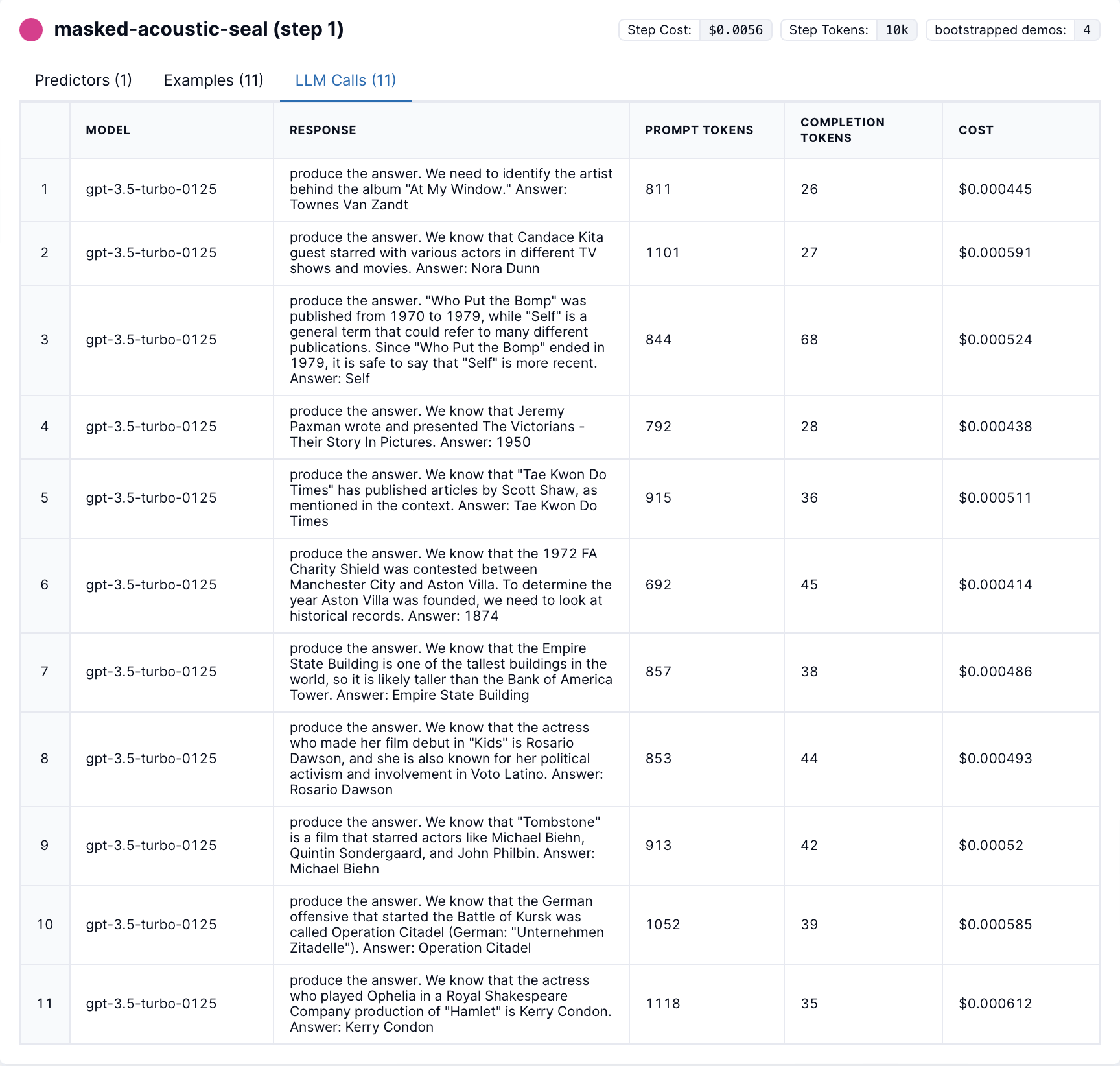
 Additionally, you can see each LLM call that has been done during the optimization with the corresponding costs and token counts.
 You can access and run the code yourself in Jupyter Notebook